Setting up your profile
You can set up your profile on My Page. Once it is filled in, you can watch the free preview videos included in our courses.
Where to find it
Section titled “Where to find it”Open My Page from the account icon at the top right of any page. The form is near the top.
You need to be signed in.
What you fill in
Section titled “What you fill in”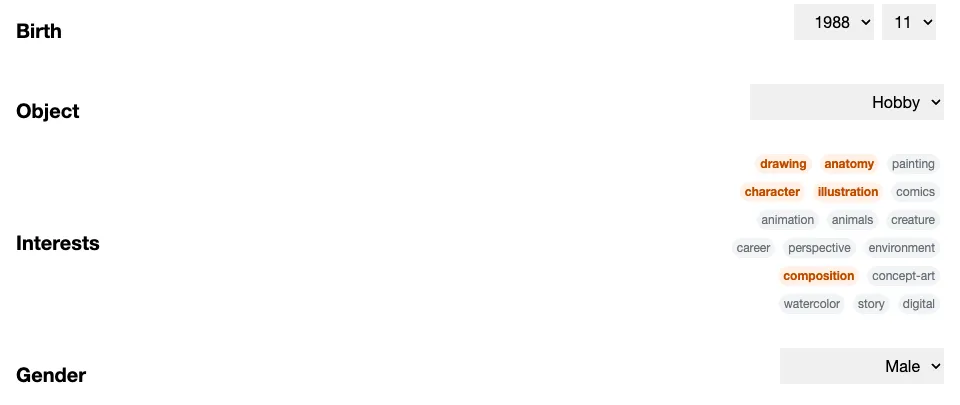
| Field | How to fill it in |
|---|---|
| Birth | Choose the year and the month |
| Object | Your goal — choose one of Pro / Aspiring, Side Hustle / Side Gig, or Hobby |
| Interests | Pick as many as you like. Tap one again to unselect it |
| Gender | Choose one of Male, Female, or Other |
There are 17 interests to choose from:
drawing / anatomy / painting / character / illustration / comics / animation / animals / creature / career / perspective / environment / composition / concept-art / watercolor / story / digital
The same screen also lets you choose the display language of the site.
There is no save button
Section titled “There is no save button”Your choice is saved the moment you make it. You do not need to press anything to confirm.
Watching the free preview videos
Section titled “Watching the free preview videos”Some courses include videos you can watch without buying the course. To watch them, all four fields above must be filled in, with at least one interest selected.
If any field is missing, tapping a video thumbnail brings you back to My Page instead of playing the video.
Courses you have already bought are not affected. You can watch what you paid for whether or not your profile is filled in.
A note about Birth
Section titled “A note about Birth”Even when you have not set it yet, the Birth field shows a default year and month. What you see is not saved yet.
If the value shown is the one you want, pick a different value first, then change it back. It is saved the moment you change it.
Changing it later
Section titled “Changing it later”You can change anything on the same screen at any time. Each change is saved as you make it.
For Object, Gender, and Language, choose the blank option at the top of the list to clear them. For Interests, tap a selected item again to remove it.
Birth is the one field you cannot clear from the screen. If you want it removed, please contact us.
What if I skip it?
Section titled “What if I skip it?”The only thing you lose is access to the free preview videos. Browsing poses, the 30-second drawing tool, and any course you have purchased all work as usual.
How is this used?
Section titled “How is this used?”We use it to improve the service — understanding who our users are and what they want to learn helps us decide which courses and features to build next.